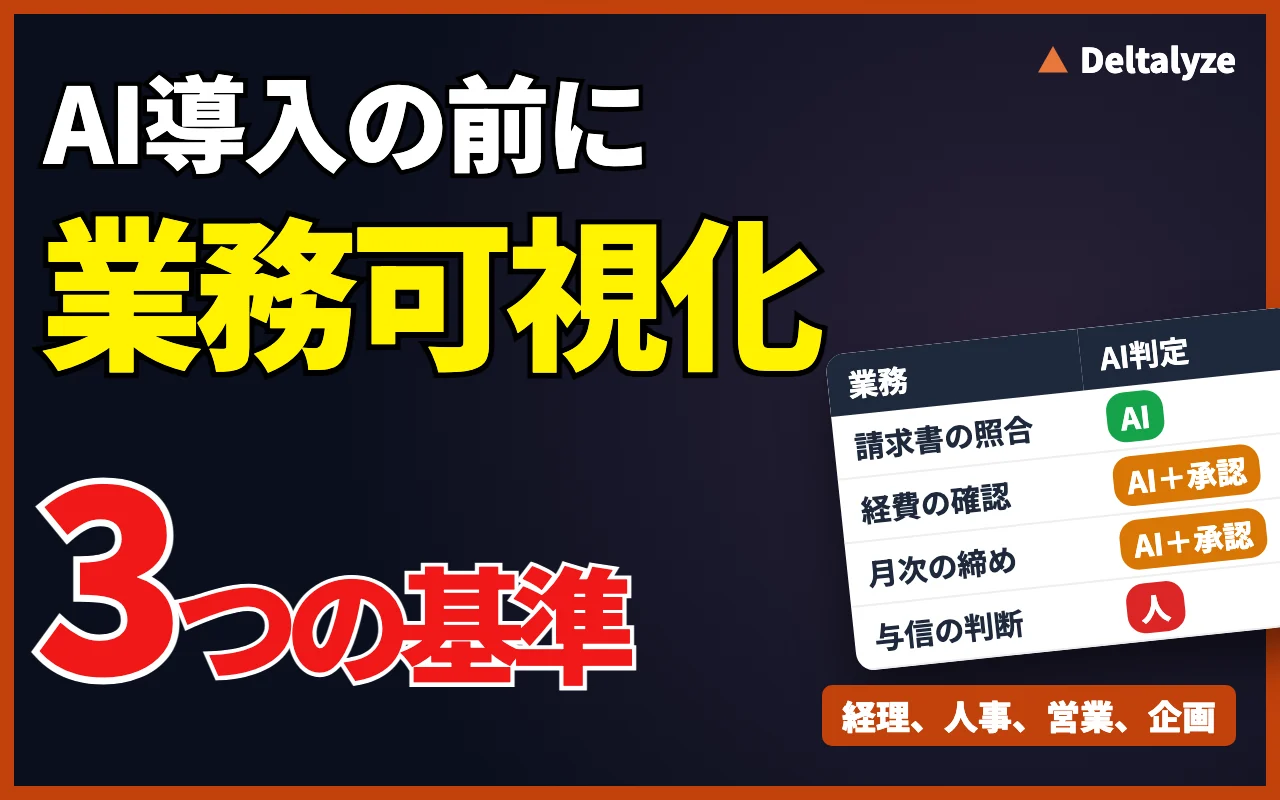
01Why visualization needs to come before tool selection
The decision to bring AI into operations doesn't start with comparing tool features—it starts with understanding the structure of your operations. According to the Ministry of Internal Affairs and Communications' Reiwa 7 Communications Usage Trend Survey, 27.3% of companies with 100 or more employees have introduced IoT or AI systems and services, an increase of 8.9 percentage points from the previous year. While adoption is spreading rapidly, the Ministry's Reiwa 7 Information and Communications White Paper reports that 55.2% of companies say they use generative AI in some form of business operation. The gap between these two figures shows that using a tool and embedding it into operations are two different things. Furthermore, IPA's DX Trends 2025 reports that while 77.8% of Japanese companies are engaged in some form of DX, the degree of results achieved varies widely from company to company. If you take comfort only in high adoption or engagement rates, you'll stumble at the stage of actually incorporating AI into real operations.
If you choose a tool first, you end up figuring out afterward where in your existing workflow to fit AI. But if you visualize your workflow first, you can separate out the steps where AI should be applied from the steps where humans should keep making the judgment calls. Get the order wrong, and you end up forcing AI onto steps it isn't suited for. This is the main cause of "we introduced it, but nobody uses it." This structure also overlaps with the idea discussed in Building the Next Generation of In-House Workflows with Generative AI—that the starting point of workflow design is not the tool, but the structure of the operation itself.
02The reality of key-person dependency, in numbers
Visualization is necessary because key-person dependency isn't a problem limited to a handful of companies. In a survey of 1,021 managers in the construction and manufacturing industries by SMB Co., Ltd., more than 70% responded that "there are operations that depend on specific individuals." Even among IT departments alone, a Buffalo Inc. survey found that 29.7% cited operational key-person dependency as a concern. A further survey by BLP LLC reported a key-person dependency rate of 92.81% at companies with 1,001 or more employees, with roughly 80% of respondents feeling the effects of operational inefficiency.
What these figures show is that key-person dependency exists broadly, regardless of company size or industry. For operations that depend on specific individuals, the procedures exist only in that person's head, and there is no source data to train AI on. In other words, before introducing AI you need to check whether the procedures for that operation have been put into words. This verification work itself is the first step of business process visualization. The finding that larger companies tend to have higher rates of key-person dependency suggests that as organizations grow, operations become more fragmented, making it easier for a situation to arise where only individual staff members grasp the full picture.
On the manufacturing floor, balancing key-person dependency with AI adoption has become an especially pressing issue. We covered the approach to driving AI adoption from the front lines in Shifting to an AI Co-Pilot Operating Model in Manufacturing. The non-negotiable conditions for success when frontline staff take the lead are summarized in Three Conditions for Successful Operator-Led AX. For insight into the structural reasons that handover documents created as a countermeasure to key-person dependency end up unused, see Why Do Handover Documents Created to Fight Key-Person Dependency End Up Unused?. When creating the documentation itself becomes the goal, the benefits of visualization don't last.
03How to visualize operations: prompts and process
Business process visualization starts by having the person responsible for an operation write down the steps themselves. The procedures that a person treats as "obvious" are precisely the ones most likely to go undocumented. Using generative AI to support the interview process is one effective approach here. Having AI act as the interviewer can draw out judgment criteria that the staff member would otherwise struggle to put into words. Below is a prompt you can use as-is.
Once you've drawn out the details, sort them, step by step, into "parts where a human is making a judgment call" and "parts governed by fixed rules." The latter are candidates for AI adoption. For the former, consider further whether the judgment criteria themselves can be made explicit. Even when judgment criteria can be made explicit, it's safer to deprioritize AI adoption for steps where exceptions occur frequently. For steps with many exceptions, the cost of having a human check AI-generated results can outweigh the savings AI delivers.
This interview process isn't a one-and-done exercise. The way operations are performed changes on a six-month to one-year cycle. A process map should be designed as something you revisit regularly, not as a fixed document, if you want it to remain useful over the long term.
When drawing out process steps, you need to dig more carefully into the parts a staff member finds "hard to explain." Judgment calls that are difficult to put into words are often, in fact, at the very core of key-person dependency. For example, in efforts to resolve key-person dependency in accounting, a roadmap that pairs strengthened controls with AI agent adoption has proven effective. We cover the specific approach in Resolving Key-Person Dependency in Accounting: A Roadmap for Strengthening Controls and Introducing AI Agents. Once you've built an interview template in one department, the burden of rolling it out to other departments drops considerably.
You are an interviewer conducting a business process analysis. I am going to describe the [operation name] that I am responsible for. Please ask me the following questions in order, one at a time, and move to the next question only after I've answered.
1. Who requests this work from you, and what do you deliver?
2. Please describe, in order, the steps from start to completion.
3. For each step, what are you looking at, and what judgment are you making (be specific about the criteria)?
4. Tell me about cases where you've had to handle an exception in the past. How did you decide what to do?
5. Which parts of this work do you believe only you can do, and why?
Once all the answers are in, summarize them as a process map (step name, input, judgment criteria, output, whether someone other than you could do it).
Replace [operation name] with an actual operation such as accounting, HR, sales, or planning. Focusing on a single operation per session improves accuracy.
04Accounting, HR, sales, planning: designing application across job functions
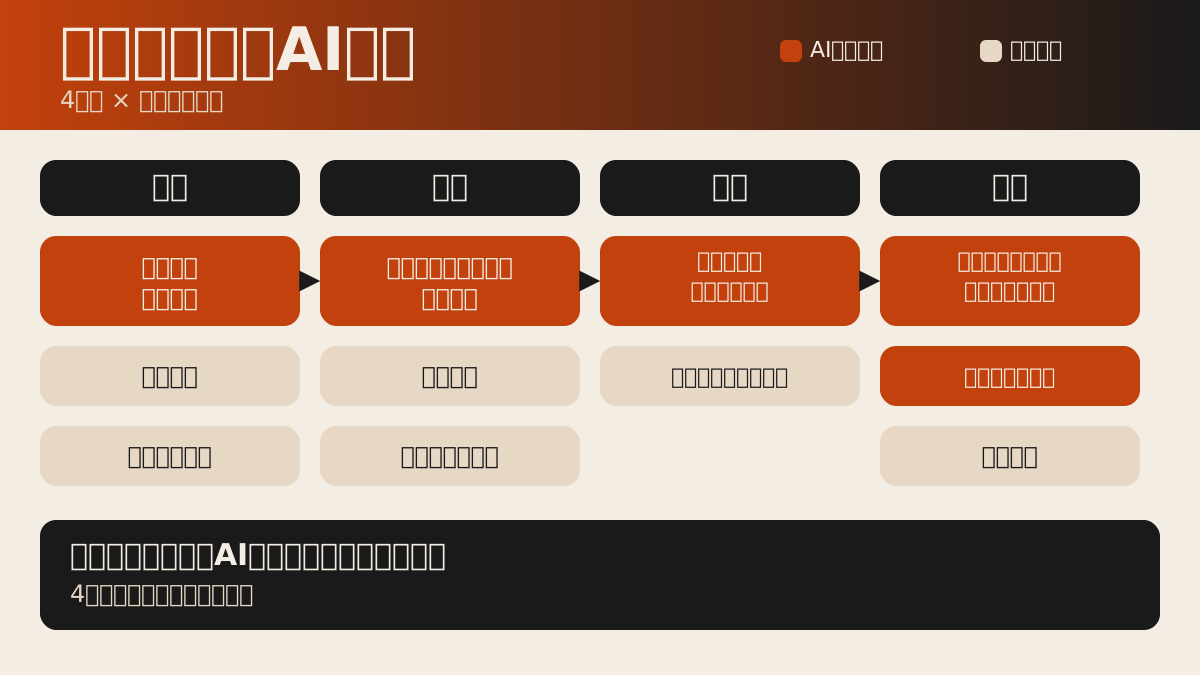
Business process visualization only delivers real benefits once it's done across job functions, not confined to a single department. In accounting, steps with clear rules, such as journal entry input and matching supporting documents, are well suited to AI. On the other hand, credit decisions and payment prioritization should be separated out as steps where human judgment remains. We cover the control-related considerations for using AI in accounting in detail in Points to Sort Out Around Internal Controls Before Using AI in Accounting and Resolving Key-Person Dependency in Accounting: A Roadmap for Strengthening Controls and Introducing AI Agents.
In HR, screening applicant documents and aggregating attendance data are steps well suited to AI. However, whether to delegate final decisions on hiring, performance evaluation, or termination to AI is a point that requires careful consideration. How much final decision-making authority to leave with AI is a question that comes up with the same structure in job functions outside of HR as well. You should decide, up front, on a design that keeps the final decision-making with humans.
In sales, prioritizing leads and drafting proposal materials are tasks easy to hand off to AI; in planning, summarizing market data and doing preliminary research for competitive analysis fit the same category. What's common across every job function is the order of operations: decide first on a structure where humans handle final approval and exception handling, and only then select which steps to assign to AI.
In departments like sales and planning, where the persuasiveness of numbers matters, there are increasingly situations where you need to express the results of AI adoption in monetary terms. That said, if you get the method of estimating savings wrong, you lose credibility. This point also connects to the issue discussed in How to Fix Savings Estimates That Get Shot Down by "So, How Much?". Deciding, at the stage when you visualize a process, how you'll measure its impact makes later internal explanations much easier.
When you line up process maps across departments, you sometimes notice that multiple departments are making similar kinds of judgments, each in its own way. Credit decisions and investment decisions, for instance, can have a similar underlying structure even though they belong to different departments. Spotting these commonalities makes it easier to decide where to start as an entire company, not just within a single department, when prioritizing AI adoption. If each department's process map uses a different format, this kind of side-by-side comparison becomes impossible. Deciding on a common set of fields—step name, input, judgment criteria, output—at the outset is the precondition that makes cross-functional comparison possible.
- Accounting: Journal entry input and document matching suit AI; credit decisions and payment prioritization remain human judgment calls
- HR: Document screening and attendance aggregation suit AI; final decisions on hiring, evaluation, and termination remain with humans
- Sales: Lead prioritization and proposal drafting suit AI; final pricing negotiation decisions remain with humans
- Planning: Market data summaries and preliminary competitive research suit AI; investment decisions and strategic choices remain with humans
05Real examples: adoption results and control design after visualization
Let's look at real examples of how far companies that have completed business process visualization have gotten in terms of results. NTT DOCOMO spun out an AI agent called "RebateX" that automates rebate reconciliation, and has begun offering it as a service. This can be seen as a case where a step well suited to standardization—reconciliation—was carved out and turned over to AI. Separately, it was reported that Sony Bank, working together with Fujitsu and AWS Japan, applied generative AI to the development of its core banking system and cut effort by 40%. Both are results that came from first separating out operational steps, then applying AI to a specific one.
On the other hand, once you've decided which steps to apply AI to, designing how data is handled and access permissions are managed becomes necessary. Introduce AI without deciding who can access which data and who approves AI output, and you create a blind spot in internal control. We cover this control design, step by step, in Points to Sort Out Around Internal Controls Before Using AI in Accounting.
When model performance or pricing changes, so does the judgment of which step to apply AI to. If you've already built a process map, deciding which tier of model to apply to which step doesn't require rethinking everything from scratch every time pricing or terms change—you can mechanically revisit the decision within your existing classification.
06What to decide after visualization: data management and approval design
The next step after business process visualization is deciding where data is stored, who has access to it, and what the approval flow for AI output looks like. Once your process map exists, write down, for each step, "which data is used," "who currently has access to that data," and "who gives final sign-off on the AI's output." Introduce AI without deciding these things first, and you'll end up redesigning permissions after the fact, grinding frontline operations to a halt.
We cover the design philosophy behind instantly connecting data with decision-making in How the Deltalyze Platform Aims to Instantly Connect Data and Decision-Making. We summarized the non-negotiable conditions for driving AI adoption from the front lines in Three Conditions for Successful Operator-Led AX. We cover the reasons that handover documents created as a countermeasure to key-person dependency end up unused in Why Do Handover Documents Created to Fight Key-Person Dependency End Up Unused?. The process map from business visualization and this governance design should be done as a set.
You also need to assume up front that permission design will be revisited after launch. Specification changes on the AI provider's side also affect the control design on the adopting company's side. The features and scope offered by enterprise AI services can change, and these kinds of updates often come with points you need to verify before putting them to use in operations. It's not unusual for a vendor's product specification change to increase the number of things that need checking on the operational workflow side. Keeping your approval flow from depending too heavily on a single tool or vendor, and holding the judgment criteria within your own process map instead, is what leads to stable operations over the long term.
- 1. Inventory the data used
For each step in the process map, write out the type of data used and where it's stored (file server, cloud storage, core system, etc.) as field names in
codeformat. - 2. Verify access permissions
Check who currently has access to that data, and judge whether access permissions need to be expanded once AI is introduced. Always decide on an approver before expanding permissions.
- 3. Document the approval flow explicitly
Add to the process map who ultimately verifies and who approves the AI's output. Temporarily exclude any step without a designated approver from AI adoption.
07How to reflect model selection and vendor trends in your process map
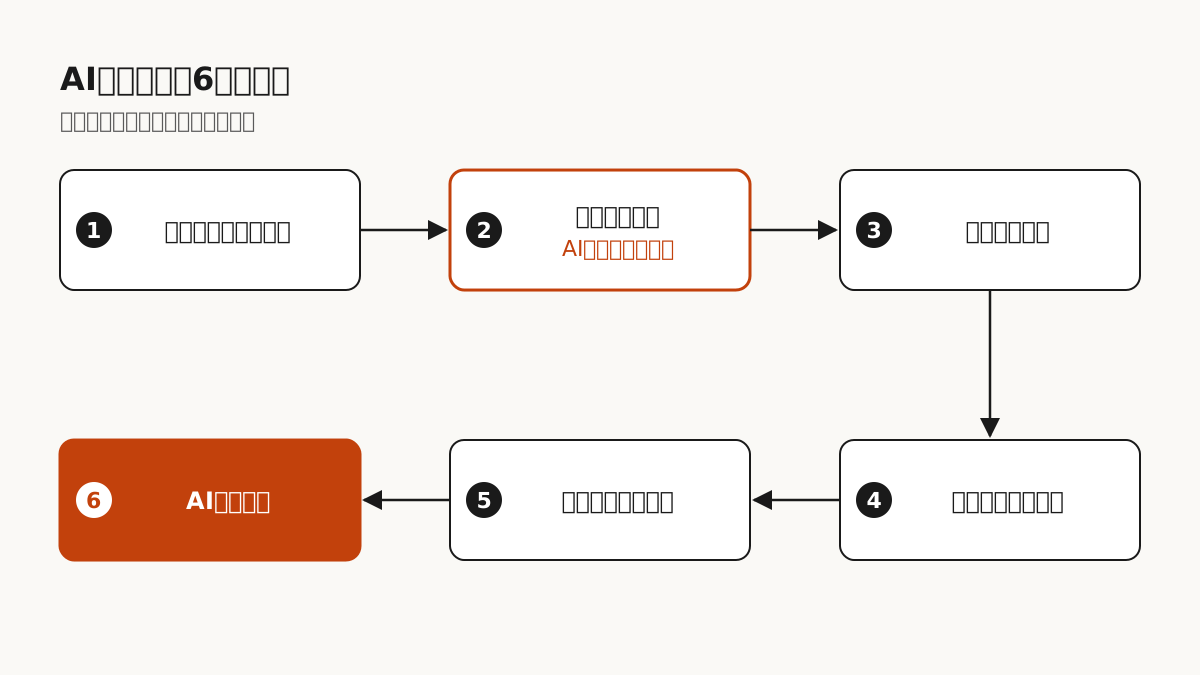
Even after you've built your process map, the question of which model to apply to which step is never settled once and for all. Every time a new model is announced, you need to revisit the balance between performance and cost. Mechanisms like always-on agents that keep running continuously without human supervision are the kind of thing that warrants careful consideration about which step of the process map they should be applied to. Also, even when a model is announced as offering top-tier performance, the way it's delivered may mean it can't necessarily be applied to every step. Announcements that clearly state pricing structure and target use cases give you material to check against which parts of your process map they could apply to.
Vendor-side management decisions also affect the plans of adopting companies. Trends in the management direction of AI companies are worth tracking as material for gauging service continuity and the direction of investment. The more a given step depends on a specific vendor, the more susceptible it becomes to the effects of that vendor's policy changes. In the HR domain, the question of how much final decision-making authority to leave with humans versus AI is starting to take concrete shape as regulation in some regions. Checking in on these kinds of external factors, which are hard to see at the stage of building the process map, during your periodic review cycle keeps your AI adoption plan from being thrown off course by a single vendor or a single regulatory development.
08What to do next
The next move after reading this article is to pick one operation at your company and build a process map for it. It doesn't matter whether it's accounting, HR, sales, or planning. Start with a single operation, use the prompt above to draw out the procedure, and classify each step as either "suited to AI" or "keeps human judgment."
Once you have the process map, use it to move on to inventorying data and checking the approval flow. Comparing tools can come afterward. Companies that finish visualizing their operations first are more likely to avoid the outcome of "we introduced it, but nobody uses it" after rolling out AI.
SOURCES
Sources and references
- Ministry of Internal Affairs and Communications「Reiwa 7 Communications Usage Trend Survey Results」(2026-05-29)
- Ministry of Internal Affairs and Communications「Reiwa 7 Information and Communications White Paper: The Current State of AI Use in Companies」(2025-07-08)
- Information-technology Promotion Agency, Japan (IPA)「DX Trends 2025: Exploring the Direction of Results Through a Japan-US-Germany Comparison」(2025-06-26)
- SMB Co., Ltd.「Survey on "Labor Shortages and Key-Person Dependency"」(2025-01-29)
- Buffalo Inc.「Survey on the Outsourcing of IT Department Operations」(2024-09-18)
- BLP LLC「Independent Survey on the Reality of Key-Person Dependency and Labor Shortages」(2025-06-10)
- BizAIdea「Sony Bank Applies Generative AI to Core Banking System Development with Fujitsu and AWS Japan, Cutting Effort by 40%」(2026-09-14)
- BizAIdea「NTT DOCOMO Spins Out "RebateX," an AI Agent That Automates Rebate Reconciliation, and Begins Offering It as a Service」(2026-09-01)
KEY TAKEAWAYS
What to carry into implementation
- The decision to bring AI into operations should start with business process visualization, before comparing tools
- Key-person dependency exists broadly, regardless of company size or industry. There's no source data for AI in operations that haven't been documented
- Across job functions like accounting, HR, sales, and planning, decide first which steps suit AI and which keep human judgment
- After visualization, decide on data management and the approval flow before introducing AI
FAQ
Frequently asked questions
Where should we start with business process visualization?
Start by picking one operation and having the person responsible write out its procedures. Using the prompt in this article to have AI act as the interviewer is an effective approach.
Do we need to visualize every department at once?
No. It's more realistic to first build a process map for one operation, establish a template for separating AI-suited steps from steps that keep human judgment, and then expand to other departments.
Can we go ahead and choose a tool right after visualization?
Once your process map exists, first decide where data is stored, who has access, and who approves AI output. Choose a tool without deciding these things first, and you'll end up redesigning permissions later.